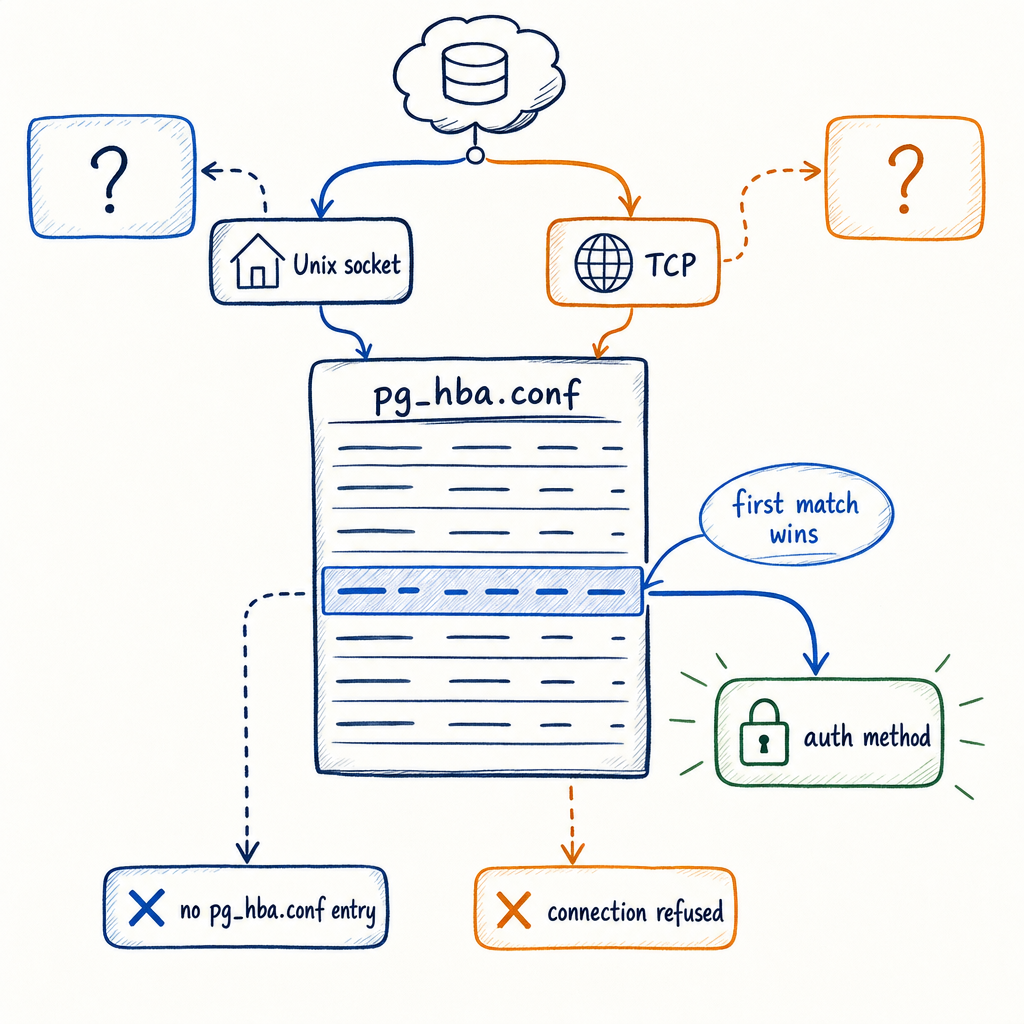
no pg_hba.conf entry for host: read pg_hba.conf in Postgres order
Anyone who has taken enough “the app can’t connect to the database” pings has seen this exact mess: a stack trace lands in Slack, Postgres has already printed the useful sentence, and the room spends the next ten minutes chasing DNS, passwords, security groups, and vibes.
This error is usually read too fast:
FATAL: no pg_hba.conf entry for host "198.51.100.44", user "app_user", database "appdb", no encryption
The password is usually irrelevant.
PostgreSQL accepted a network connection far enough to evaluate host-based authentication. Then it walked through the active pg_hba.conf and failed to find a rule for this combination: connection type, client address, database, and user.
Do not translate it into one of these:
- the password is wrong
- the role definitely does not exist
- the database definitely does not exist
- the network is definitely blocked
Postgres checked pg_hba.conf from the first line downward. Nothing matched.
First match wins. No fallthrough. No “try the next rule if auth fails.” Once a line matches, that line’s method is used, and matching stops.
The error Postgres actually gives you
Example:
psql: error: connection to server at "db.example.net" (203.0.113.20), port 5432 failed:
FATAL:  no pg_hba.conf entry for host "198.51.100.44", user "app_user", database "appdb", no encryption
The useful fields are already in the message:
| Field | Meaning |
|---|---|
host "198.51.100.44" | The client IP address as the server sees it |
user "app_user" | The database role requested by the client |
database "appdb" | The database requested by the client |
no encryption | The connection did not use SSL/TLS |
In this message, host does not mean hostname. It means a TCP/IP connection attempt, as opposed to a Unix-domain socket connection.
Compare these two failures:
FATAL: no pg_hba.conf entry for host "198.51.100.44", user "app_user", database "appdb", no encryption
No HBA line matched.
FATAL: password authentication failed for user "app_user"
An HBA line matched, then the password check failed.
Those go to different branches in the runbook.
How pg_hba.conf matching works
A normal pg_hba.conf has five logical columns:
# TYPE   DATABASE   USER        ADDRESS             METHOD

local    all        postgres                        peer
local    all        all                             peer

host     all        all         127.0.0.1/32        scram-sha-256
host     all        all         ::1/128             scram-sha-256

hostssl  appdb      app_user    198.51.100.44/32    scram-sha-256
host     all        all         0.0.0.0/0           reject
| Column | What it matches or controls |
|---|---|
TYPE | Connection type: local socket, TCP, SSL TCP, or non-SSL TCP |
DATABASE | Requested database name, or keywords like all |
USER | Requested database role, or keywords like all |
ADDRESS | Client IP range for TCP connections |
METHOD | Authentication method, such as peer, scram-sha-256, md5, trust, or reject |
The TYPE column causes a lot of bad edits:
| Type | Meaning |
|---|---|
local | Unix-domain socket connection only |
host | TCP/IP connection, SSL or non-SSL |
hostssl | TCP/IP connection using SSL/TLS |
hostnossl | TCP/IP connection without SSL/TLS |
A local rule never matches TCP. A host rule never matches a Unix socket.
These two commands can hit different HBA records on the same server:
psql -U app_user -d appdb
Usually a Unix socket connection, because no host was supplied.
psql -h 127.0.0.1 -U app_user -d appdb
TCP, because a host was supplied.
First match wins
Postgres reads pg_hba.conf sequentially.
Ordering matters.
This file is broken:
# TYPE   DATABASE   USER        ADDRESS             METHOD

host     all        all         0.0.0.0/0           reject
hostssl  appdb      app_user    198.51.100.44/32    scram-sha-256
The specific hostssl rule will never help. The broad reject rule appears first, matches, rejects the connection, and stops processing.
Put the narrow allow rule first:
# TYPE   DATABASE   USER        ADDRESS             METHOD

hostssl  appdb      app_user    198.51.100.44/32    scram-sha-256
host     all        all         0.0.0.0/0           reject
A dull but common version:
# TYPE   DATABASE   USER        ADDRESS             METHOD

host     appdb      app_user    10.10.5.23/32       scram-sha-256
That line does nothing for a client arriving from 10.10.5.24.
The address must match what the server sees. Not what the application owner expected. Not what the NAT diagram said last month.
Step by step: fix no pg_hba.conf entry for host
Start on the database server.
1. Find the active HBA file
Do not edit whatever locate pg_hba.conf finds first.
Ask Postgres:
SHOW hba_file;
Example:
              hba_file
------------------------------------
 /var/lib/postgresql/16/main/pg_hba.conf
(1 row)
Docker images, distro packages, source installs, and managed platforms put this file in different places. SHOW hba_file; wins the argument.
Check for parse errors while you are there:
SELECT line_number, type, database, user_name, address, auth_method, error
FROM pg_hba_file_rules
WHERE error IS NOT NULL;
2. Copy the values from the error
Do not “clean them up.”
Given:
FATAL: no pg_hba.conf entry for host "198.51.100.44", user "app_user", database "appdb", no encryption
You need a TCP rule matching:
type:      host, hostnossl, or hostssl if the client uses SSL
database:  appdb
user:      app_user
address:   198.51.100.44/32, or a CIDR range containing it
method:    your intended authentication method
3. Add the narrowest practical rule
For password authentication allowing SSL or non-SSL:
# TYPE   DATABASE   USER        ADDRESS             METHOD
host     appdb      app_user    198.51.100.44/32    scram-sha-256
For SSL only:
# TYPE   DATABASE   USER        ADDRESS             METHOD
hostssl  appdb      app_user    198.51.100.44/32    scram-sha-256
Put specific allow rules above broad catch-alls like these:
host     all        all         0.0.0.0/0           reject
host     all        all         ::/0                reject
Do not paper over the problem with this:
host all all 0.0.0.0/0 trust
That line lets anyone who can reach port 5432 over IPv4 connect as any database user without a password. On a real network, that is a security incident with a timestamp.
4. Reload Postgres
Saving the file changes nothing by itself.
Reload Postgres.
SELECT pg_reload_conf();
Expected output:
 pg_reload_conf
----------------
 t
(1 row)
Or from the shell:
pg_ctl reload -D /var/lib/postgresql/16/main
Reloading re-reads pg_hba.conf without dropping existing connections. A restart also works, but it interrupts sessions for no gain. For an HBA edit, reload is the right move.
Worked example: Docker container hitting host Postgres
The app runs in a container. Postgres runs on the host. The app logs this:
FATAL: no pg_hba.conf entry for host "172.17.0.2", user "app_user", database "appdb", no encryption
From Postgres’s side, the client is not 127.0.0.1. It is coming from the Docker bridge network.
Add a rule scoped to the bridge range you actually use:
# TYPE   DATABASE   USER        ADDRESS             METHOD
host     appdb      app_user    172.17.0.0/16       scram-sha-256
Reload:
SELECT pg_reload_conf();
From inside the container, verify the app connects to an address that reaches the host Postgres. If the app uses localhost, it is usually talking to itself.
For the default bridge network, the host is often reachable here:
PGHOST=172.17.0.1
PGDATABASE=appdb
PGUSER=app_user
On Docker Desktop, host.docker.internal may be the correct host name instead.
Do not guess. Use the IP in the Postgres error.
Worked example: laptop to a cloud VM
Error:
FATAL: no pg_hba.conf entry for host "203.0.113.77", user "deploy", database "appdb", no encryption
On the VM:
SHOW hba_file;
Add a narrow line for the laptop’s current public IP:
# TYPE   DATABASE   USER     ADDRESS           METHOD
hostssl  appdb      deploy   203.0.113.77/32   scram-sha-256
Reload:
SELECT pg_reload_conf();
From the laptop:
PGHOST=db.example.net
PGPORT=5432
PGDATABASE=appdb
PGUSER=deploy
PGSSLMODE=require
psql
If the error says no encryption, and your HBA line is hostssl, the client did not use SSL/TLS. Set:
PGSSLMODE=require
or put this in the connection string:
sslmode=require
Laptop public IPs move around: home ISP, office network, coffee shop Wi-Fi, VPN, mobile hotspot. When the same error comes back later, check the client IP before reopening the whole investigation.
Unix sockets vs TCP: the /tmp/.s.PGSQL.5432 problem
When you omit -h, psql commonly tries a Unix-domain socket:
psql -U app_user -d appdb
That is a local connection in pg_hba.conf.
When you specify a host, it uses TCP:
psql -h 127.0.0.1 -U app_user -d appdb
That is a host connection in pg_hba.conf.
This socket-path error is separate from HBA:
psql: error: connection to server on socket "/tmp/.s.PGSQL.5432" failed:
No such file or directory
        Is the server running locally and accepting connections on that socket?
The client looked for a socket file in one directory. The server is either down or created the socket somewhere else.
Check where the server creates sockets:
SHOW unix_socket_directories;
Common defaults vary by install style:
| Install style | Common socket directory |
|---|---|
| Homebrew PostgreSQL on macOS | /tmp |
| Postgres.app on macOS | /tmp |
| Debian/Ubuntu packages | /var/run/postgresql |
| Docker official image | /var/run/postgresql inside the container |
If the server socket is in /var/run/postgresql, point the client there:
PGHOST=/var/run/postgresql psql -U app_user -d appdb
Or force TCP and stop guessing socket paths:
psql -h 127.0.0.1 -U app_user -d appdb
Those two commands authenticate through different HBA types:
PGHOST=/var/run/postgresqlmatcheslocalHBA lines.-h 127.0.0.1matcheshostHBA lines.
This is the annoying local case where this works:
sudo -u postgres psql
but this fails:
psql -h 127.0.0.1 -U postgres
The first likely used a Unix socket and matched peer. The second used TCP and needed a host rule plus whatever password method that rule specifies.
Picking the right authentication method
Once an HBA line matches, its METHOD column decides which authentication mechanism Postgres will enforce for that connection.
Common methods:
peer— uses the local OS user name for local socket connections; no password needed.scram-sha-256— password-based, the current default for new clusters. Use this unless you have a specific reason not to.md5— legacy password hashing; avoid it when possible.cert— client certificate authentication. Requires a certificate infrastructure.trust— no authentication at all. Only safe on a completely isolated loopback interface.reject— drops the connection unconditionally. Useful as a final catch-all line.
If you are adding a rule for a remote client, scram-sha-256 is almost always the right choice. Pair it with hostssl to require TLS.
For a local socket connection used by a system daemon, peer works well when the OS user maps cleanly to the database role.
A method mismatch never causes the no pg_hba.conf entry error. That error fires before Postgres even considers the method. Once you have a matching line, the method you put there becomes the next thing you will troubleshoot if the connection still fails with an authentication error.
When the error won’t go away
Before you change anything else on the database server, do these three things in order:
- Trust the IP in the error message. Do not assume NAT rewrites it. Do not guess the container’s bridge address. Use exactly the address Postgres reported.
- Add a narrow rule before the reject line.
hostssl appdb app_user 203.0.113.77/32 scram-sha-256is safer than opening a wide range. - Run
SHOW hba_file;and reload. Check for parse errors withpg_hba_file_rules. If a line has a syntax mistake, the whole file can be ignored and all connections will fall through to an implicit reject.
Most investigations that drag on for hours come from one of three mistakes: the active pg_hba.conf was not the file being edited, the client used a different host flag than expected (socket vs TCP), or the allow rule was placed after a blanket reject. Stick to the order in the file and the IP the server sees, and the fix is usually one line.