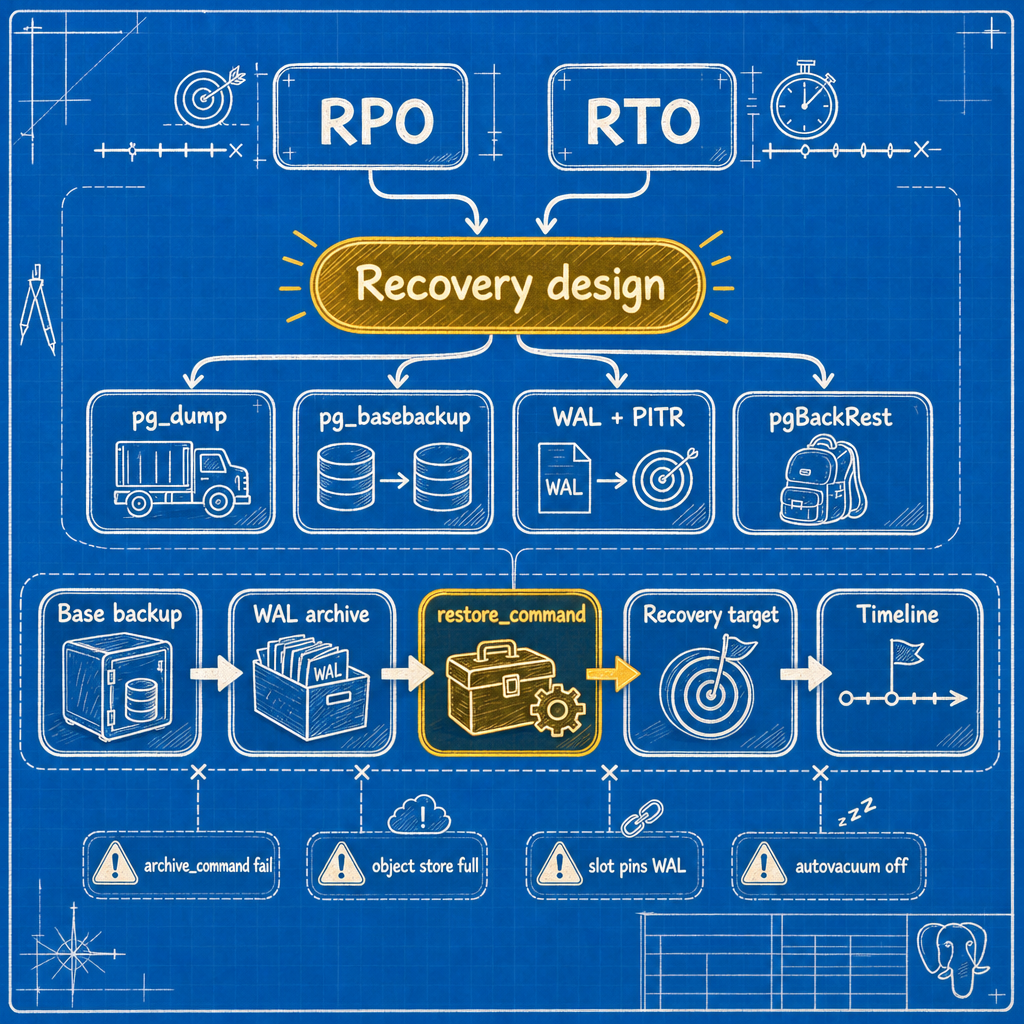
Most Postgres backup failures aren't backup failures at all — they're silent upstream problems that only surface when you actually need to restore. If your postgres backup and disaster recovery plan hasn't been tested end-to-end with a real restore, you don't have a plan, you have a hope.
The incident that started with a full bucket
The nightly backup job reported success right up until the bucket filled. On paper, everything was green. In reality, the failure had entered the system through autovacuum weeks earlier, and the backup chain was just the last domino to fall. By the time anyone noticed, the retention window had already rolled past the last good recovery point.
This is the shape most Postgres disaster recovery incidents take: not a dramatic single failure, but a slow accumulation of small, unmonitored problems that only become visible during a restore — which is the worst possible moment to discover them.
When to stop hand-rolling backups
Below a couple of hundred gigabytes, cron plus pg_basebackup plus a careful archive_command is defensible. This is the classic pg_basebackup vs pg_dump tradeoff at small scale: pg_dump gives you a portable logical snapshot, pg_basebackup gives you a physical copy you can replay WAL against for point-in-time recovery. Neither one alone is a disaster recovery strategy.
Above a few hundred gigabytes, you want full/differential/incremental backups, parallel compression and transfer, retention expiry that actually deletes, delta restore that only fetches changed files, and verification code you didn't write yourself.
pgBackRest is the default choice here. It handles all of the above, supports multiple repositories, and does PITR via --type=time --target. Its check command validates that WAL archiving and the repository are genuinely working — the single most valuable thing in the package, and exactly the check that would have flagged the incident above within minutes instead of weeks. Run it from cron and alert on non-zero exit.
WAL-G is leaner and object-store-native, a good fit if your whole estate lives in S3 or GCS and you want minimal moving parts. Barman suits shops that want a centralized backup server model with its own catalogue and strong cloud object-storage integration.
The honest cost: each of these adds a configuration surface, a version to keep current, and failure modes that are theirs rather than Postgres's. You're trading "I understand every line of my 40-line script" for a tool that handles cases you haven't thought of yet. Above a few hundred GB, that trade is the correct one.
3-2-1, made concrete for Postgres
Three copies, two media, one off-site and immutable. For a Postgres estate, that means:
- Local repo on a separate filesystem from
$PGDATA— not a different directory on the same LVM volume, which fools nobody. - Remote object store in a different region or provider, receiving base backups and WAL.
- Immutable or offline copy: object lock or versioning with a retention policy your database credentials cannot override. Ransomware and a compromised backup service account are the same threat model, and both defeat two-copy setups.
Monitoring the WAL archiving and backup chain
Alert on these, with real thresholds — "monitor archiving" is not an instruction.
-- Archiver health. Alert if failed_count rises, and separately
-- if last_archived_time falls behind.
SELECT archived_count,
       last_archived_wal,
       last_archived_time,
       failed_count,
       last_failed_wal,
       last_failed_time,
       now() - last_archived_time AS since_last_archive
FROM pg_stat_archiver;
Two distinct alerts here. failed_count increasing over a 5-minute window means archiving is erroring: warn. now() - last_archived_time exceeding 2x your archive_timeout means archiving has silently stopped progressing — the more dangerous state: page. Also confirm the archiver process is alive at all; archive_mode = on with no archiver running is a state you can reach.
-- WAL directory size trend.
SELECT pg_size_pretty(sum(size)) AS pg_wal_size
FROM pg_ls_waldir();
Alert on sustained growth over a 6-hour window rather than a bare absolute size — a healthy busy cluster can legitimately carry a large pg_wal — but page regardless at 60% of the filesystem or 4x your steady-state baseline, whichever comes first.
-- Slots pinning WAL.
SELECT slot_name, slot_type, active, wal_status,
       pg_size_pretty(
         pg_wal_lsn_diff(pg_current_wal_lsn(), restart_lsn)
       ) AS retained_wal
FROM pg_replication_slots
ORDER BY pg_wal_lsn_diff(pg_current_wal_lsn(), restart_lsn) DESC;
Alert on any inactive slot, and on retained_wal above roughly 10 GB or wal_status in ('extended','lost'). An inactive physical slot pins WAL indefinitely for a consumer that may no longer exist; max_slot_wal_keep_size is the backstop, not the primary defense.
-- Autovacuum liveness: the check that would have caught the incident.
SELECT schemaname, relname,
       last_autovacuum,
       n_dead_tup,
       age(c.relfrozenxid) AS xid_age
FROM pg_stat_user_tables s
JOIN pg_class c ON c.oid = s.relid
WHERE n_dead_tup > 100000
   OR age(c.relfrozenxid) > 200000000
ORDER BY xid_age DESC
LIMIT 20;
Page when any relation's relfrozenxid age exceeds 200 million, and warn when a table with meaningful write traffic has no last_autovacuum in 48 hours. Also alert on repeated automatic vacuum of table ... ERROR lines in the log. That one line would have surfaced the earlier incident in days instead of nineteen.
Finally, alert on the age of the oldest successful full backup. If your policy is weekly fulls, page at 10 days. A backup system that quietly stops producing backups looks identical to one that never runs.
Setting real RPO and RTO targets
Every postgres RPO and RTO conversation should produce two numbers, not a paragraph of intent. RPO is bounded by your archive_timeout and archiving health — if WAL ships every 5 minutes and archiving is current, your worst-case data loss is roughly 5 minutes. RTO is whatever your last restore drill actually measured, not what the documentation implies. If you haven't timed a restore recently, you don't have an RTO — you have a guess.
Restore rehearsal: the only test that counts
An unrestored backup is an untested hypothesis. It doesn't matter how confident the vendor documentation makes you feel — if you haven't restored it, you don't know it works. Run this quarterly at minimum, monthly if your RTO is under an hour.
Restore drill checklist
- Provision a throwaway host with the same major Postgres version and comparable storage class.
- Pick a recovery target at random within your retention window. Not last night — random targets catch gaps.
- Start a stopwatch. This measures RTO, and it's the number you report.
- Fetch the base backup from the remote repository, not the local one. You're testing the copy you'd actually use.
- Verify it:
pg_verifybackuporpgbackrest verify. - Restore, configure
restore_commandandrecovery_target_timefor PostgreSQL point-in-time recovery, createrecovery.signal, and start withrecovery_target_action = pause. - Confirm the log shows WAL replay reaching the target and pausing.
- Run assertions: row counts on the five largest tables, a checksum over a stable column set,
max(created_at)within tolerance of the target. - Restore globals from
pg_dumpall --globals-onlyand confirm application roles can connect. - Promote and confirm the instance accepts writes.
- On versions before PostgreSQL 18, run
ANALYZEand time one representative production query — a fresh restore has no planner statistics, and "the restore worked but the app is unusably slow" is a real failure mode, not a hypothetical one. - Stop the stopwatch. Record wall-clock RTO.
- File the number against the SLA. If it exceeds the RTO, open a finding with an owner and a date — don't let it sit as a note in a doc nobody reopens.
- Destroy the host.
Script it. A checklist that depends on someone remembering thirteen steps correctly at 3am only works if nothing goes wrong — and nothing going wrong is exactly what you can't count on during a real incident.
The 90-minute starting configuration
For a team that currently has a nightly dump and nothing else.
# postgresql.conf
wal_level = replica
archive_mode = on
archive_command = 'pgbackrest --stanza=main archive-push %p'
archive_timeout = 300s
max_wal_senders = 10
max_slot_wal_keep_size = 64GB
summarize_wal = on          # PG17+, enables incremental base backups
log_autovacuum_min_duration = 0
# /etc/pgbackrest/pgbackrest.conf
[global]
repo1-path=/var/lib/pgbackrest
repo1-retention-full=2
repo2-type=s3
repo2-s3-bucket=pg-backups-prod
repo2-retention-full=4
process-max=8
compress-type=zst
start-fast=y

[main]
pg1-path=/var/lib/pgsql/17/data
# crontab (postgres)
0  2 * * 0   pgbackrest --stanza=main --type=full backup
0  2 * * 1-6 pgbackrest --stanza=main --type=diff backup
*/10 * * * * pgbackrest --stanza=main check || /usr/local/bin/alert backup-check-failed
0  3 1 * *   /usr/local/bin/restore-drill.sh
This setup gets you pgBackRest PITR out of the box: point-in-time restores by timestamp, LSN, or named restore point, backed by a tested and monitored WAL chain rather than a hopeful cron job.
Alerts to configure today, in priority order:
pgbackrest checknon-zero exit.pg_stat_archiverarchive lag exceeding 2xarchive_timeout.pg_walsize above 60% of its filesystem.- Oldest successful full backup older than 10 days.
- Any
relfrozenxidage above 200 million. - Repeated autovacuum ERROR lines in the log.
That configuration takes about ninety minutes to stand up, and it would have caught the incident above at three independent points. None of them were exotic. Alert 6 would have fired on day one.
Backups are not a tool you buy. They are two numbers you commit to, a chain you maintain, and a drill you run whether or not anything is wrong. Everything else is implementation detail. If you'd rather have someone else own that chain and the 3am pages that come with it, that's the kind of ongoing operational work teams like MyDBA tend to pick up.