PostgreSQL Streaming Replication Setup: The Missed Half
Setting up PostgreSQL streaming replication is simple: create a replication role, add one pg_hba.conf line, run pg_basebackup, start the standby. Thirty minutes if you type slowly.
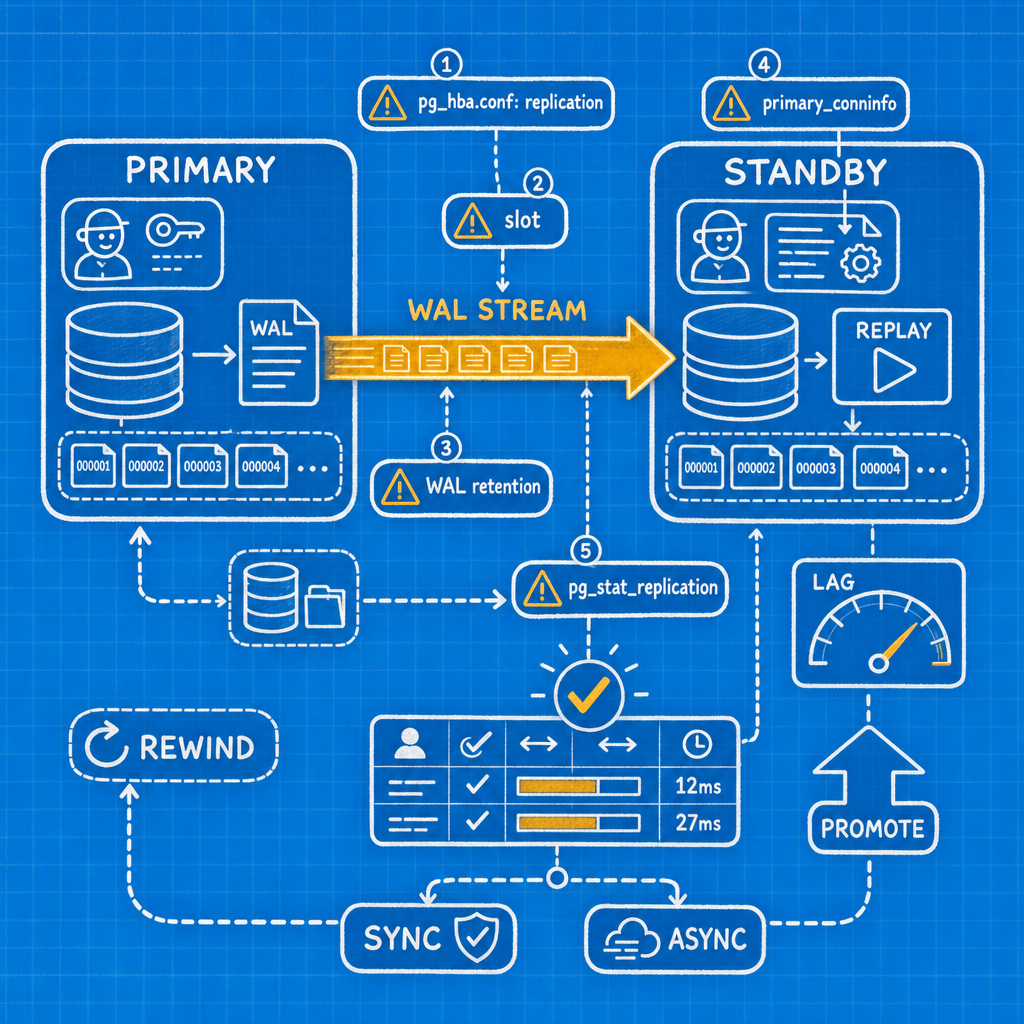
What's not simple is proving it works — and that's where most broken standbys come from. Almost every one I get called to fix is broken for one of five boring reasons:
pg_hba.confdoesn't have the literalreplicationkeyword in it.- There's no replication slot, or there's a slot nobody remembers creating.
- WAL retention was never thought about, so the standby fell off the back of the primary.
primary_conninfowas copied from a blog post written for PostgreSQL 9.4, still referencingrecovery.conf.- Nobody ever looked at
pg_stat_replicationafter the build finished.
This guide covers the full build — then spends just as much effort on verification, lag measurement, sync decisions, promotion, and rebuild. The build is the easy part. Proving it works is the job.
What streaming replication actually is
The primary generates WAL records for every change. A walsender process on the primary reads those records and pushes them over a normal libpq connection flagged as a replication connection. On the standby, a walreceiver process writes them to disk, and the startup process replays them continuously. The standby stays in recovery forever, and because hot_standby defaults to on, it accepts read-only connections the whole time.
That's the whole mental model. Physical, block-level, byte-for-byte.
What it does not give you:
- No filtering. You replicate the entire cluster — all databases, all tables. Per-table selection is logical replication, a different feature.
- No automatic failover. PostgreSQL ships no cluster manager. If the primary dies at 3am, nothing promotes the standby unless you have Patroni, repmgr, or pg_auto_failover in front of it.
- No backup.
DROP TABLE customersreplicates to the standby in milliseconds. Physical replication protects you from losing a host, not from losing your judgement.
The lab we'll build
Two Debian-flavoured hosts, PostgreSQL 17:
| Host | IP | Role | Data dir | Config dir |
|---|---|---|---|---|
| pg-a | 10.0.0.11 | primary | /var/lib/postgresql/17/main | /etc/postgresql/17/main |
| pg-b | 10.0.0.12 | standby | /var/lib/postgresql/17/main | /etc/postgresql/17/main |
Hard rule before you start: physical replication requires the same PostgreSQL major version on both ends, plus matching architecture and block size. You cannot stream from 16 to 17, and you cannot stream from an x86_64 primary to an ARM standby. If your two hosts didn't come from the same package repository running the same version, fix that first. Planning a major upgrade? That's logical replication or pg_upgrade, not this.
Everything below works the same on 16 and 18; version differences are flagged as they come up.
Step 1: create the replication role on the primary
postgres@pg-a:~$ psql
psql (17.4 (Debian 17.4-1.pgdg120+2))

postgres=# CREATE ROLE repl WITH REPLICATION LOGIN PASSWORD 'ch4nge-me';
CREATE ROLE
The REPLICATION attribute is what lets this role open a replication connection. A superuser can do it too, and plenty of tutorials tell you to just use postgres. Don't. A replication connection only needs to request WAL streaming or run pg_basebackup; handing out superuser for a job this narrow is just extra blast radius if the credential leaks.
Check password encryption while you're here:
postgres=# SHOW password_encryption;
 password_encryption
---------------------
 scram-sha-256
If that says md5, fix it before you build the standby, not after.
Step 2: pg_hba.conf and the replication gotcha
This is the single most common failure, and it catches people who have run Postgres for years.
In pg_hba.conf, replication connections are matched only by the literal keyword replication in the database column. The keyword all does not match them. It reads like it should. It doesn't.
Add this to /etc/postgresql/17/main/pg_hba.conf on pg-a:
# TYPE  DATABASE      USER  ADDRESS        METHOD
host    replication   repl  10.0.0.12/32   scram-sha-256
Reload — no restart needed for pg_hba.conf changes:
postgres=# SELECT pg_reload_conf();
 pg_reload_conf
----------------
 t
Get this wrong and here's exactly what the standby logs:
FATAL:  could not connect to the primary server: connection to server at
"10.0.0.11", port 5432 failed: FATAL:  no pg_hba.conf entry for replication
connection from host "10.0.0.12", user "repl", no encryption
Note "for replication connection" — that phrase is the tell. If you see it while psql -h 10.0.0.11 -U repl postgres works fine from the same host, you've hit the all trap.
Also confirm the primary is listening: listen_addresses = '*' (or the specific interface) in postgresql.conf — that one needs a restart.
Step 3: the WAL settings that matter
On modern defaults you often need to change almost nothing. wal_level has defaulted to replica since 9.6 — exactly what physical replication needs. max_wal_senders has defaulted to 10 since PostgreSQL 10. On 16 or newer, untouched, you're already 90% configured.
| Parameter | Default | What I set | Why | Restart? |
|---|---|---|---|---|
wal_level | replica | leave it | Sufficient unless you also do logical decoding | Restart |
max_wal_senders | 10 | leave it (raise for >4 standbys) | Each standby, and each pg_basebackup -X stream, uses one | Restart |
wal_keep_size | 0 MB | 0, use slots instead | Renamed from wal_keep_segments in PG13 | Reload |
max_slot_wal_keep_size | -1 (unlimited) | 64GB or ~25% of the WAL filesystem | The seatbelt against a dead standby filling your disk (PG13+) | Reload |
wal_sender_timeout | 60s | leave it | Raise only on genuinely awful WAN links | Reload |
wal_receiver_status_interval | 10s | leave it | How often the standby reports its position back | Reload |
hot_standby | on | leave it | Standby serves read-only queries out of the box | Restart |
wal_log_hints | off | on if checksums are off | Prerequisite for pg_rewind later | Restart |
That last row matters more than it looks. PostgreSQL 18 enables data checksums by default in initdb; on 17 and earlier they're off unless someone ran initdb -k. pg_rewind needs one or the other. Decide now — turning on wal_log_hints needs a restart, and you won't want to schedule one the day your primary dies.
postgres=# SHOW data_checksums;
 data_checksums
----------------
 off
Set wal_log_hints = on on both hosts and restart the primary at your next maintenance window.
Step 4: create a physical replication slot
postgres=# SELECT * FROM pg_create_physical_replication_slot('pg_b_slot');
 slot_name | lsn
-----------+-----
 pg_b_slot |
Or skip this and let pg_basebackup -C -S pg_b_slot create it during the backup — closing the window between the backup finishing and the standby's first connection. That's the option shown in the next step.
A physical replication slot makes the primary retain WAL until the standby confirms receipt, eliminating:
FATAL: requested WAL segment 000000010000000000000012 has already been removed
Now the honest half. That same guarantee means an inactive slot grows pg_wal without bound. If the standby dies at midnight and nobody notices, the primary keeps every WAL segment forever, and eventually the WAL filesystem hits 100% and Postgres shuts down. You've traded "standby breaks" for "primary breaks" — a worse failure. I've seen it happen.
So set the seatbelt. max_slot_wal_keep_size (PG13+, default -1) caps how much WAL slots may retain. Slots past the cap are invalidated and their wal_status becomes lost — a broken standby needing a rebuild, versus a primary that stopped.
max_slot_wal_keep_size = 64GB
I use slots on every pair I build, and I've never regretted setting the cap.
Step 5: pg_basebackup standby setup
On pg-b, stop Postgres and empty the data directory — pg_basebackup requires the target directory to be empty or nonexistent.
root@pg-b:~# systemctl stop postgresql@17-main
root@pg-b:~# rm -rf /var/lib/postgresql/17/main/*
Put the password somewhere non-interactive:
postgres@pg-b:~$ echo '10.0.0.11:5432:*:repl:ch4nge-me' > ~/.pgpass
postgres@pg-b:~$ chmod 600 ~/.pgpass
Then:
postgres@pg-b:~$ pg_basebackup \
    -h 10.0.0.11 \
    -U repl \
    -D /var/lib/postgresql/17/main \
    -X stream \
    -c fast \
    -R \
    -C -S pg_b_slot \
    -P
Flag by flag:
-X streamstreams WAL over a second connection while the backup runs (default since PG10). The resulting backup is self-contained and doesn't depend on WAL archiving. It also consumes a second walsender slot.-c fastrequests an immediate checkpoint instead of waiting for the next scheduled one.-Rwrites the recovery configuration — details in the next step.-C -S pg_b_slotcreates the named physical slot on the primary before copying data. If you already created it in step 4, drop-Cand just pass-S pg_b_slot.-Pprints a progress bar. On a 2TB cluster you'll want it.
88213456/88213456 kB (100%), 1/1 tablespace
Copy postgresql.conf and pg_hba.conf across too if your distro keeps them outside the data directory — Debian does.
Step 6: standby.signal and primary_conninfo
First, kill the myth. recovery.conf was removed in PostgreSQL 12. A standby is signalled by an empty standby.signal file in the data directory, and recovery settings are ordinary GUCs in postgresql.conf or postgresql.auto.conf. A server that finds a recovery.conf file present refuses to start. If a tutorial tells you to write standby_mode = 'on', close the tab.
Here's what -R produced:
postgres@pg-b:~$ ls -l /var/lib/postgresql/17/main/standby.signal
-rw------- 1 postgres postgres 0 Aug  3 10:14 standby.signal

postgres@pg-b:~$ tail -2 /var/lib/postgresql/17/main/postgresql.auto.conf
primary_conninfo = 'user=repl passfile=''/var/lib/postgresql/.pgpass'' host=10.0.0.11 port=5432 sslmode=prefer'
primary_slot_name = 'pg_b_slot'
Three things I always add on top.
Set application_name
Without it, pg_stat_replication.application_name shows something useless like walreceiver, and synchronous_standby_names has nothing to name:
primary_conninfo = 'user=repl passfile=''/var/lib/postgresql/.pgpass'' host=10.0.0.11 port=5432 sslmode=prefer application_name=pg_b'
Add a restore_command if you archive WAL
Belt and braces: if the standby falls behind further than the slot can cover, it can fetch from the archive instead of needing a full rebuild.
restore_command = 'cp /var/lib/postgresql/wal_archive/%f %p'
Set query conflict settings
In postgresql.conf on the standby:
hot_standby_feedback = on          # default off
max_standby_streaming_delay = 30s  # default, tune per workload
I turn hot_standby_feedback on when the standby serves real read traffic, and leave it off when the standby exists purely for failover — a genuine trade, covered below.
Since PostgreSQL 13, primary_conninfo and primary_slot_name can be changed with a reload; the walreceiver restarts to pick up the change automatically.
Step 7: start it and read the logs
root@pg-b:~# systemctl start postgresql@17-main
root@pg-b:~# tail -f /var/log/postgresql/postgresql-17-main.log
What you want, in this order:
LOG:  entering standby mode
LOG:  redo starts at 0/3000028
LOG:  consistent recovery state reached at 0/3000100
LOG:  database system is ready to accept read-only connections
LOG:  started streaming WAL from primary at 0/4000000 on timeline 1
That last line is the one that matters. "entering standby mode" only means the signal file was found. "started streaming WAL" means the connection is live.
Common alternatives:
FATAL: ... no pg_hba.conf entry for replication connection from host "10.0.0.12" ...
Step 2 — the replication keyword.
FATAL: ... Connection refused
Network or firewall, not Postgres — check listen_addresses on pg-a.
FATAL: could not start WAL streaming: ERROR: replication slot "pg_b_slot" does not exist
You set primary_slot_name but never created the slot, or dropped it during a rebuild.
FATAL: database system identifier differs between the primary and standby
The data directory wasn't actually replaced by pg_basebackup.
Verification: the five checks before you call it done
1. pg_stat_replication on the primary
postgres=# SELECT application_name, state, sent_lsn, write_lsn, flush_lsn, replay_lsn,
                  write_lag, flush_lag, replay_lag, sync_state
             FROM pg_stat_replication;
-[ RECORD 1 ]----+----------------
application_name | pg_b
state            | streaming
sent_lsn         | 0/4A2F1C8
write_lsn        | 0/4A2F1C8
flush_lsn        | 0/4A2F1C8
replay_lsn       | 0/4A2F1C8
write_lag        | 00:00:00.000412
flush_lag        | 00:00:00.001103
replay_lag       | 00:00:00.001188
sync_state       | async
Read it as a pipeline: sent_lsn is how far the walsender has pushed, write_lsn how far the standby has written to the OS, flush_lsn how far it's fsynced, replay_lsn how far it's actually applied — what read queries on the standby can see. state should be streaming; catchup right after a build is normal and temporary; startup that never changes is a problem.
2. pg_stat_wal_receiver on the standby
postgres=# SELECT status, sender_host, slot_name, received_lsn, latest_end_lsn
             FROM pg_stat_wal_receiver;
-[ RECORD 1 ]--+------------
status         | streaming
sender_host    | 10.0.0.11
slot_name      | pg_b_slot
received_lsn   | 0/4A2F1C8
latest_end_lsn | 0/4A2F1C8
An empty result means there's no walreceiver running at all — a different problem from a slow one.
3. It really is a standby
postgres=# SELECT pg_is_in_recovery();
 pg_is_in_recovery
-------------------
 t

postgres=# CREATE TABLE oops (i int);
ERROR:  cannot execute CREATE TABLE in a read-only transaction
Run the failing statement — it takes two seconds and proves you're connected to the host you think you are.
4. The round-trip test
The check people skip, and the only one that proves data is moving end to end, not just being received.
On pg-a:
postgres=# CREATE TABLE repltest(id int, t timestamptz default now());
CREATE TABLE
postgres=# INSERT INTO repltest(id) VALUES (1);
INSERT 0 1
postgres=# SELECT pg_switch_wal();
 pg_switch_wal
---------------
 0/4A30B90
On pg-b, immediately:
postgres=# SELECT * FROM repltest;
 id |               t
----+-------------------------------
  1 | 2026-08-03 10:22:41.883104+00

postgres=# SELECT pg_last_xact_replay_timestamp();
 pg_last_xact_replay_timestamp
-------------------------------
 2026-08-03 10:22:41.883104+00
The timestamps match. Replay is live, not just receipt. Drop the table when you're done.
5. Slot health
postgres=# SELECT slot_name, slot_type, active, wal_status,
                  pg_size_pretty(safe_wal_size) AS safe_wal
             FROM pg_replication_slots;
 slot_name | slot_type | active | wal_status | safe_wal
-----------+-----------+--------+------------+----------
 pg_b_slot | physical  | t      | reserved   | 63 GB
wal_status (PG13+) takes reserved, extended, unreserved, or lost. reserved is healthy. extended means the slot has passed wal_keep_size but is still within max_slot_wal_keep_size. unreserved means it's over the cap and about to be invalidated. lost means the WAL is gone — that standby needs a fresh base backup, not a restart.
How to check replication lag without fooling yourself
Three different numbers, three different meanings.
Byte lag, from the primary:
SELECT application_name,
       pg_size_pretty(pg_wal_lsn_diff(pg_current_wal_lsn(), replay_lsn)) AS replay_bytes
  FROM pg_stat_replication;
Time lag, also from the primary: the replay_lag column, measured from actual round trips, so it reflects real applied delay.
Wall-clock lag, from the standby:
SELECT now() - pg_last_xact_replay_timestamp() AS apparent_lag;
That third one is where false alerts come from. pg_last_xact_replay_timestamp() returns the commit time of the last replayed transaction, and NULL if nothing's been replayed yet. On an idle primary it simply stops advancing, so now() - pg_last_xact_replay_timestamp() climbs by a second every second while replication is perfectly healthy. I've seen this generate a false-positive page at 3am because a monitoring check assumed rising delay always meant trouble.
Byte lag alone has the opposite blind spot: if the standby receives WAL fine but replay is stuck behind an AccessExclusiveLock conflict, received_lsn keeps moving while replay_lsn sits still. Compare the two, and alert on replay_lag as the primary signal.
Sync or async? Choose deliberately
synchronous_commit accepts off, local, remote_write, on, and remote_apply. Only the last three involve standbys:
remote_write: the standby has written the commit to the OS, not necessarily fsynced.on: the standby has flushed it to disk — the usual meaning of "synchronous."remote_apply: the standby has replayed it, so a read query there will see it. Strongest and slowest.
Standbys are named by their application_name, set in primary_conninfo back in step 6:
synchronous_standby_names = 'FIRST 1 (pg_b, pg_c)'
means wait for the first available standby in priority order, versus:
synchronous_standby_names = 'ANY 1 (pg_b, pg_c)'
which waits for any one to confirm. The ANY quorum form arrived in PostgreSQL 10, and it's the one you want with three or more nodes.
The blunt warning, and it's documented behaviour, not a bug: if synchronous_standby_names names exactly one standby and that standby goes away, commits on the primary block until it comes back or you change the setting. A two-node synchronous pair converts a standby outage into a primary outage.
My default for a two-node pair is asynchronous. I'd go synchronous when the data genuinely can't tolerate losing the last few hundred milliseconds of commits, and only with three nodes and ANY 1, so losing one standby doesn't stall anything.
How to promote a PostgreSQL standby
postgres@pg-b:~$ pg_ctl -D /var/lib/postgresql/17/main promote
waiting for server to promote.... done
server promoted
Or from SQL, available since PostgreSQL 12:
postgres=# SELECT pg_promote();
 pg_promote
------------
 t
promote_trigger_file was removed in PostgreSQL 16. If your runbook says "touch /tmp/promote.trigger," it's out of date — those two commands are the mechanism now.
Promotion increments the timeline ID and writes a .history file into the WAL directory and archive:
LOG:  received promote request
LOG:  redo done at 0/4A30B90
LOG:  selected new timeline ID: 2
LOG:  archive recovery complete
LOG:  database system is ready to accept connections
Other standbys will follow the new primary if they can reach the history file, because recovery_target_timeline has defaulted to latest since PostgreSQL 12.
Promotion itself is one line. The hard parts are fencing the old primary so it can't accept writes and cause split-brain, and moving the client endpoint. That coordination problem is exactly why Patroni, repmgr, and pg_auto_failover exist. Nothing in core PostgreSQL does automatic failover — don't try to write it yourself with a shell script and a cron job.
Rebuilding the old primary with pg_rewind
After a failover the old primary has diverged: it holds WAL the new primary never saw. A fresh pg_basebackup works but copies everything — on a 4TB cluster over a 1Gb link that's most of a day.
pg_rewind synchronises only the changed blocks since the fork point. Prerequisites: the target cluster must have data checksums enabled, or wal_log_hints = on. Neither can be turned on retroactively without a restart and, for checksums, a full rewrite — decide before you build, not after you need it.
Shut down the old primary cleanly first, then:
postgres@pg-a:~$ pg_rewind \
    --target-pgdata=/var/lib/postgresql/17/main \
    --source-server='host=10.0.0.12 port=5432 user=repl dbname=postgres' \
    --progress
Then write standby.signal, point primary_conninfo at the new primary, create a slot for it, and start. You're back to a pair, reversed.
If the old primary crashed hard, or checksums and wal_log_hints were both off, rewind isn't available and you re-clone — which is why wal_log_hints gets flagged so early in the build.
Failure modes that actually bite
The orphaned slot. A client's standby lost network for a weekend, unnoticed because alerting only checked "is Postgres up" on the primary. The slot dutifully retained every byte of WAL. By Monday, pg_wal had grown into the hundreds of gigabytes and the primary's disk hit 100%. Postgres doesn't gracefully degrade there; it crash-loops. We found more disk in twenty minutes — that was luck, not planning. Set max_slot_wal_keep_size. Alert on inactive slots.
Query cancellations on the standby. max_standby_streaming_delay defaults to 30 seconds. When replay needs a lock a standby query is holding, the query gets killed:
ERROR:  canceling statement due to conflict with recovery
DETAIL:  User query might have needed to see row versions that must be removed.
Raise the delay and the standby falls behind during conflicts; lower it and reports die. Pick whichever hurts less for that workload.
hot_standby_feedback bloat. Turning it on stops most cancellations by telling the primary which rows the standby still needs — which also stops vacuum from cleaning those rows on the primary. A long-running report on the standby can bloat tables on the primary. It defaults to off for a reason.
Config drift. pg_hba.conf and postgresql.conf aren't replicated. Every rule added on the primary must be added to the standby, or the day you promote you'll discover half your application can't connect. Put both files in configuration management.
Treating the standby as a backup. It isn't. Take real backups — a DELETE or a dropped table replicates in milliseconds.
Monitoring you need on day one
Four alerts. Everything else is optional.
-- 1. Any slot not currently connected
SELECT slot_name FROM pg_replication_slots WHERE NOT active;

-- 2. Any slot whose WAL retention is no longer safe
SELECT slot_name, wal_status FROM pg_replication_slots
 WHERE wal_status <> 'reserved';

-- 3. Replay lag over threshold, from the primary
SELECT application_name, replay_lag FROM pg_stat_replication
 WHERE replay_lag > interval '60 seconds';
# 4. WAL directory size, from the shell
du -sm /var/lib/postgresql/17/main/pg_wal
Alert on 1 and 2 as pages. Alert on 3 as a warning first, page on sustained breach. Graph 4 always — a rising pg_wal with a flat write rate is the earliest signal of a stuck slot. Any one of these firing alone is annoying. All four firing together is the disk-full scenario above. If you'd rather not build and babysit this yourself, teams like MyDBA run PostgreSQL replication and failover as a managed service.
The checklist
- Same major version, same architecture, same block size on both hosts.
CREATE ROLE repl WITH REPLICATION LOGIN PASSWORD '...'on the primary.host replication repl 10.0.0.12/32 scram-sha-256inpg_hba.conf— the wordreplication, spelled out, notall.SELECT pg_reload_conf();and confirmlisten_addresses.- Confirm
wal_level=replica,max_wal_senders>=10; setmax_slot_wal_keep_size; enable checksums orwal_log_hints. - Stop the standby, empty its data directory.
pg_basebackup -h 10.0.0.11 -U repl -D <pgdata> -X stream -c fast -R -C -S pg_b_slot -P- Confirm
standby.signalexists andpostgresql.auto.confhasprimary_conninfo/primary_slot_name— norecovery.conf, ever, on PG12+. - Add
application_nametoprimary_conninfo; sethot_standby_feedbackandmax_standby_streaming_delay; copy config files. - Start the standby; confirm "started streaming WAL from primary at X/Y on timeline N" in the log.
- Run all five verification checks, including the
pg_switch_walround trip. - Decide sync vs async deliberately, and wire up the four alerts before you close the ticket.
Steps 11 and 12 are the ones that get skipped, and they're the ones that decide whether this pair is still working in six months. Streaming replication protects you against losing a host. It does not give you failover, and it does not protect you from a bad DELETE. Plan for both separately.