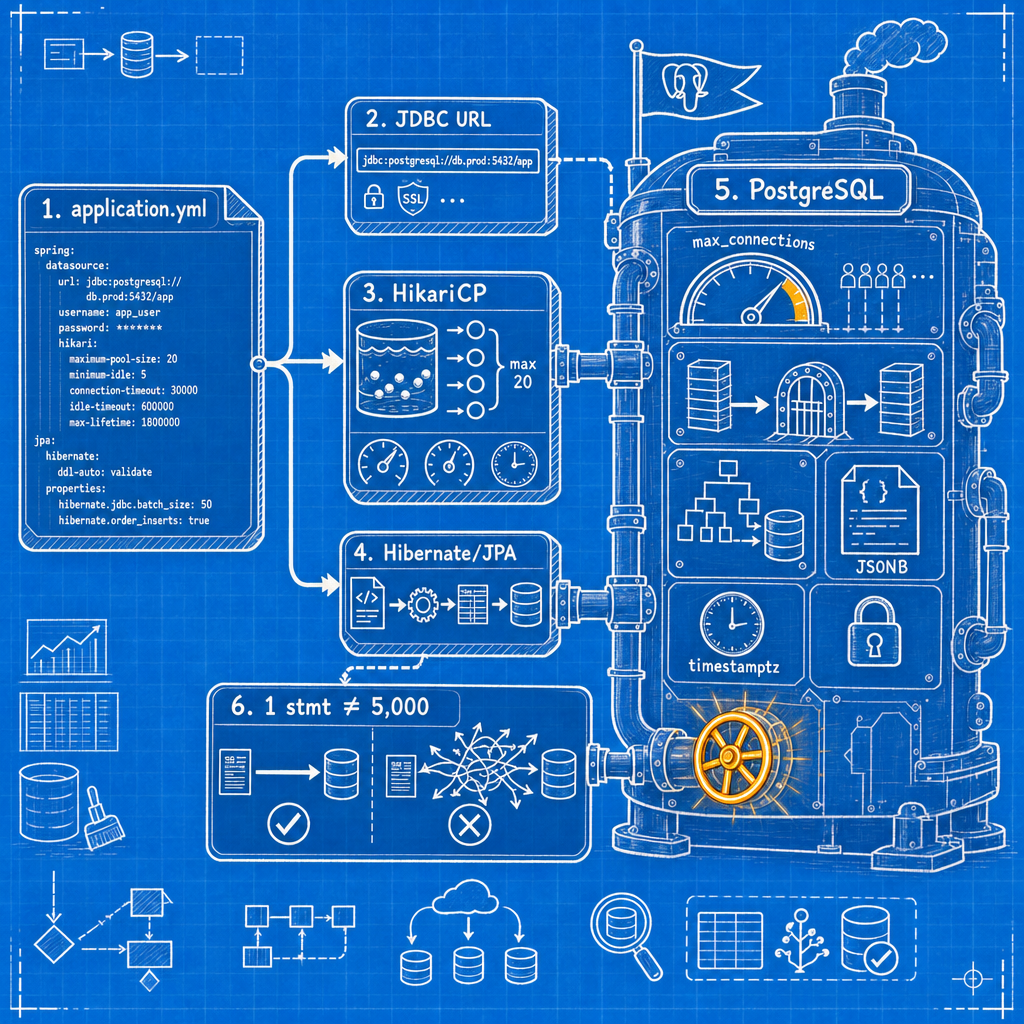
Spring Boot's default PostgreSQL configuration is built for portability, not production. sslmode defaults to prefer, which silently downgrades to plaintext if SSL fails. socketTimeout defaults to unlimited, so a stalled query can hold a pooled connection hostage indefinitely. And every connection shows up in pg_stat_activity with application_name blank, so when you're diagnosing lock contention at 2am, you're grepping through anonymous rows trying to guess which of your six services is holding the lock.
None of these are bugs. They're defaults chosen for portability, not for production. The config works perfectly well until the day it doesn't, and by then the person who wrote it has usually moved to another team. This is a working reference for Spring Boot PostgreSQL configuration, HikariCP settings, and JPA/Hibernate tuning, with reasoning you can cite in a code review.
Dependencies and versions: what Spring Boot 3 assumes
If you're on Spring Boot 3.x, you're on Java 17 minimum and the jakarta.* namespace, not javax.*. This trips people up specifically when upgrading from Boot 2.7: every javax.persistence.Entity import needs to become jakarta.persistence.Entity, and IDE auto-import will happily keep suggesting the wrong one from muscle memory. Check this first if a 2.7-to-3.x upgrade throws ClassNotFoundException on things that used to work.
For the dependency itself: use spring-boot-starter-data-jpa if you're using JPA/Hibernate, or spring-boot-starter-jdbc if you're doing raw JDBC or something like jOOQ or Spring Data JDBC. Both pull in HikariCP transitively as the connection pool. Add org.postgresql:postgresql with runtime scope. You don't need it at compile time, and the version is managed by the Spring Boot BOM, so don't pin it yourself unless you have a specific reason (a CVE fix that hasn't reached the BOM yet is the usual reason).
spring-boot-starter-data-jpa brings Hibernate 6 as the JPA provider. That matters for several sections below, because Hibernate 6 changed dialect resolution and default type mappings in ways that make a chunk of older Stack Overflow answers actively wrong.
The DataSource: URL, driver, and connection properties nobody sets
The pgjdbc URL format is jdbc:postgresql://host:port/database, and you append connection parameters as query-string key/value pairs. The driver class is org.postgresql.Driver, and Spring Boot derives it from the URL scheme, so spring.datasource.driver-class-name is normally unnecessary for a Spring Boot datasource PostgreSQL setup. Set it only if you're doing something unusual like routing through a JDBC proxy driver.
The properties that actually change behavior in production:
sslmode: defaults to prefer, which means "try SSL, and if the server says no, connect in plaintext without telling anyone." That's a silent downgrade. For anything talking to a database over a network you don't fully control, set sslmode=verify-full, which both encrypts and validates the server certificate and hostname. require encrypts without verifying identity; I don't recommend it as a default because it still lets a MITM with any cert through.
ApplicationName: sets the Postgres application_name for the session, which is what shows up in pg_stat_activity. Set this to something like orders-service or orders-service-prod-pod3. The five minutes it takes to add this property pays for itself the first time you're staring at forty rows of pg_stat_activity during an incident and need to know which service is holding a lock.
currentSchema: sets the search path for the session. Useful when one database hosts multiple schemas and you don't want to rely on the role's default search_path, or when you want the JDBC URL itself to be self-documenting about which schema an app targets.
connectTimeout and socketTimeout: both expressed in seconds. connectTimeout bounds how long the driver waits to establish a TCP connection. socketTimeout defaults to 0, meaning unlimited: a hung read on a stalled query or a dead network path will block that thread indefinitely, holding a pooled connection hostage the whole time. Set both. I use connectTimeout=10 and socketTimeout=30 as a starting point, tuned down if your queries are genuinely fast and you want faster failure detection.
options=-c statement_timeout=30000: sets a session-level statement timeout via a libpq-style options string. I generally prefer setting statement_timeout at the role level in Postgres (covered later) via ALTER ROLE, so it survives a config rollback and applies uniformly regardless of which client connects. The URL form is useful when one particular application needs a tighter bound than its peers.
You can set these either as URL query parameters or via spring.datasource.hikari.data-source-properties:
spring:
  datasource:
    url: jdbc:postgresql://db.internal:5432/appdb?sslmode=verify-full&ApplicationName=orders-service
    hikari:
      data-source-properties:
        connectTimeout: 10
        socketTimeout: 30
I prefer splitting them this way: identity and security-relevant params (sslmode, schema) live in the URL because they're part of "where and how do I connect," while timeouts and driver tuning live in data-source-properties because they read as pool/driver configuration, not addressing. Either location works technically (pgjdbc reads both), so pick one convention and be consistent across services, because a mixed convention is what makes a diff review take twice as long.
Secrets, profiles, and the Boot 3.1+ ConnectionDetails escape hatch
Hardcoded passwords in application.yml survive in Git history forever, even after you rotate the credential and delete the line: git log -p doesn't forget. Externalize with environment variables at minimum:
spring:
  datasource:
    username: ${DB_USERNAME}
    password: ${DB_PASSWORD}
For anything beyond a toy app, pull those from a secrets manager (Vault, AWS Secrets Manager, whatever your platform uses) injected as env vars at container start, not committed anywhere.
Spring Boot 3.1 introduced the ConnectionDetails abstraction, along with the spring-boot-docker-compose module, the spring-boot-testcontainers module, and the @ServiceConnection annotation. Together these mean your dev and test profiles no longer need to duplicate JDBC URLs by hand. Point @ServiceConnection at a Testcontainers Postgres instance or a docker-compose service, and Spring Boot wires up the URL, username, and password automatically from the running container. It's the difference between three profile-specific YAML blocks that drift out of sync and one annotation that can't drift because it reads the actual running container.
HikariCP: sizing the pool against Postgres, not against hope
HikariCP has been the default JDBC pool since Spring Boot 2.0, pulled in transitively by both starters mentioned earlier. Spring Boot only falls back to Tomcat JDBC or Commons DBCP2 if HikariCP isn't on the classpath, which in practice means you have to go out of your way to not use it. Configure Spring Boot HikariCP Postgres settings under spring.datasource.hikari.*.
The default maximumPoolSize is 10. minimumIdle defaults to match maximumPoolSize, meaning Hikari runs as a fixed-size pool out of the box. Keep it that way: don't set minimumIdle lower than maximumPoolSize to "save connections" during quiet periods. Ramping pool size up under load adds connection-establishment latency exactly when you can least afford it, and Postgres connections aren't expensive to hold idle the way, say, a thread might be.
The number that actually matters is how spring.datasource.hikari.maximum-pool-size interacts with Postgres's max_connections, which defaults to 100, minus whatever's carved out by reserved_connections and superuser_reserved_connections. That reservation means your real budget for application pools is lower than the raw max_connections figure, often by 3-10 connections depending on your configuration.
The math: total connections consumed = (number of app instances × pool size per instance) + migration connections + admin/monitoring connections + the reserved slots Postgres holds back. Worked example: six pods, each with maximumPoolSize: 20, gives you 120 connections against a max_connections=100 database. That's already over budget before a single migration job or psql session from an on-call engineer connects. The fix isn't a bigger max_connections; it's a smaller pool. Six pods at maximumPoolSize: 12 gives you 72, leaving headroom for migrations, monitoring, and a human.
The counterintuitive part, and it is genuinely counterintuitive if you're coming from a thread-pool-sizing mindset: a smaller pool is usually faster under contention, not slower, when it comes to Spring Boot Postgres connection pool tuning. HikariCP's own sizing guidance is explicit about this and cites the PostgreSQL-oriented formula connections = ((core_count * 2) + effective_spindle_count) as a starting point: a database server with 8 cores and SSD storage (spindle count effectively 1) lands around 17 connections total, server-wide, being genuinely useful under load. That's the server's budget across all clients, not one service's pool size. More connections than that just means more context switching and lock contention on the Postgres side for no throughput gain. If you're skeptical, the fastest way to convince yourself is to load test both configurations against the same database and watch p99 latency, not just throughput.
Connection lifecycle: max-lifetime, idle-timeout, keepalive, and leak detection
| Property | Default | Postgres-specific reason to change it |
|---|---|---|
connection-timeout | 30000 ms | Floor is 250 ms. Lower it if you'd rather fail fast and retry than let a request thread wait 30s for a pool slot. |
idle-timeout | 600000 ms (10 min) | Only applies above minimumIdle; largely irrelevant if you run a fixed-size pool as recommended above. |
max-lifetime | 1800000 ms (30 min) | Must be shorter than any idle/connection cap enforced by Postgres, PgBouncer, or a NAT gateway/firewall in between. |
validation-timeout | 5000 ms | Rarely needs changing. |
keepalive-time | 0 (disabled) | Enable at 2-5 minutes if you sit behind infrastructure that silently drops idle TCP connections. |
leak-detection-threshold | 0 (disabled) | Enable at 30-60s in any environment where you've been burned by a connection leak, which is to say: everywhere. |
The one rule that matters most: max-lifetime has to be set shorter than any connection-killing timeout upstream of it. HikariCP's own documentation is explicit that the pool should retire a connection on its own terms before something else (the database, a proxy, a firewall) kills it out from under an in-flight query.
Real scenario I've seen more than once: a NAT gateway or load balancer enforces a 5-minute idle timeout on TCP connections. HikariCP's max-lifetime is left at the 30-minute default. Every morning at roughly the same time, usually right after the overnight traffic lull, when a batch of pooled connections have all been sitting idle past the NAT's threshold, the app starts throwing connection reset by peer on the first requests of the day. The fix is either keepalive-time set below the NAT's idle threshold (so Hikari pings the connection before the NAT drops it) or reducing max-lifetime to force proactive recycling. Keepalive is the better fix here because it addresses the actual idle-timeout problem instead of just failing over faster.
Pair leak-detection-threshold with Postgres's idle_in_transaction_session_timeout, which defaults to 0 (disabled). A leaked connection (code that opens a transaction and never commits, rolls back, or closes it) should die on both ends: Hikari logs a stack trace when a connection is checked out longer than the threshold, and Postgres independently kills the session if it's sitting idle inside an open transaction past the timeout, releasing whatever locks it's holding. Relying on just one of these means either you get a warning with no forced cleanup, or Postgres cleans up but you never find the buggy code path that caused it.
Living with PgBouncer: prepared statements and pool modes
If Postgres sits behind PgBouncer, know what pool mode you're running before you touch anything else.
pgjdbc switches a PreparedStatement to a server-side named prepared statement after prepareThreshold executions of the same statement; the default is 5. That's a meaningful optimization for hot-path queries, but it depends on the server-side connection staying the same between executions, which is exactly what transaction-mode PgBouncer doesn't guarantee: it multiplexes many client connections across a smaller pool of server connections, potentially handing your client a different backend on every transaction. Historically this broke named prepared statements outright in transaction mode.
PgBouncer 1.21.0 changed this: it added support for prepared statements in transaction mode, gated by max_prepared_statements, which defaults to 0 (disabled). If you're on PgBouncer 1.21+ and want prepared statement support in transaction mode, you have to explicitly set max_prepared_statements above zero on the PgBouncer side.
If you're on an older PgBouncer, or you don't want to depend on max_prepared_statements being configured correctly everywhere, the safe compatibility fallback is prepareThreshold=0 on the JDBC URL, which disables server-side prepared statements entirely and falls back to simple query protocol. You lose the prepared-statement optimization, but you stop getting cryptic "prepared statement does not exist" errors during traffic spikes. Left at the default of 5 otherwise; there's no reason to disable it if you're not behind older transaction-mode PgBouncer.
Session-mode PgBouncer doesn't have this problem: each client gets a dedicated server connection for the session's duration, so prepared statements behave normally. It just doesn't give you the connection-multiplexing benefit that makes PgBouncer worth running in the first place.
One more thing people miss: don't size Hikari's pool and PgBouncer's pool both large. If Hikari holds 20 connections per pod and PgBouncer is also configured with a large default_pool_size, you've just added a second layer of pooling with no benefit. Pick one layer to do the actual limiting, usually PgBouncer, and keep Hikari's pool at a size that reflects real per-pod concurrency needs.
Hibernate PostgreSQL dialect: stop setting it manually
Hibernate 6 resolves the SQL dialect automatically from JDBC metadata. The versioned classes you'll find in old tutorials (PostgreSQL95Dialect, PostgreSQL10Dialect) are deprecated or gone. If you genuinely need to set the Spring Boot Hibernate PostgreSQL dialect explicitly (multi-database test setups are the usual reason), use org.hibernate.dialect.PostgreSQLDialect. Otherwise, delete the line. spring.jpa.database-platform doesn't need to appear in your config at all.
spring.jpa.hibernate.ddl-auto defaults to create-drop only when Spring Boot detects an embedded database; against Postgres it defaults to none, so a Postgres-backed app doesn't generate schema unless you tell it to. In production, set it explicitly to validate: not update, not absent-and-hoping. Hibernate checks the entity mappings against the actual schema at startup and fails fast if they've drifted, without touching DDL. update is tempting because it's convenient in a demo, and that convenience is exactly the problem: it applies schema changes inferred from your entity model directly against a live database, with no migration history, no rollback path, and no review step. Hand schema ownership to Flyway instead, pointed at spring.flyway.url / spring.flyway.user with a separate owner role that the application's runtime role doesn't have, and set clean-disabled: true so nobody's migration script can wipe production by accident.
The settings that change your SQL: batching, identity strategy, open-in-view
Batching
Set hibernate.jdbc.batch_size (via spring.jpa.properties.hibernate.jdbc.batch_size) along with hibernate.order_inserts and hibernate.order_updates set to true. Ordering groups statements of the same type together so Hikari's underlying JDBC batch can actually batch them, rather than interleaving inserts and updates in a way that defeats batching entirely. Add reWriteBatchedInserts=true on the pgjdbc connection string. This rewrites a batch of single-row INSERT statements into one multi-values INSERT, cutting round trips dramatically for Spring Boot JPA Postgres batch insert workloads. Without it: INSERT INTO orders (id, total) VALUES (1, 10.00) repeated N times as N round trips. With it: INSERT INTO orders (id, total) VALUES (1, 10.00), (2, 20.00), (3, 30.00) as one. Confirm no entity in a hot write path is still using GenerationType.IDENTITY; see below for why that silently kills all of this.
Identity strategy
This is the one that quietly costs people the most. Hibernate does not batch inserts for entities using GenerationType.IDENTITY, because it has to execute each insert immediately to get the generated key back. There's no way to defer and batch when the ID itself is unknown until the row exists. If your entity looks like:
@Id
@GeneratedValue(strategy = GenerationType.IDENTITY)
private Long id;
...every one of your batch-size and reWriteBatchedInserts settings is dead code for that entity. Switch to SEQUENCE:
@Id
@GeneratedValue(strategy = GenerationType.SEQUENCE, generator = "orders_seq")
@SequenceGenerator(name = "orders_seq", sequenceName = "orders_id_seq", allocationSize = 50)
private Long id;
Now here's the war story: @SequenceGenerator.allocationSize defaults to 50, and Hibernate uses a pooled optimizer on that assumption: it grabs a block of 50 IDs from the sequence in one round trip and hands them out locally, only going back to the database when the block is exhausted. If your migration tool created the underlying Postgres sequence with the default INCREMENT BY 1, Hibernate's assumption and the sequence's actual behavior diverge: Hibernate thinks it owns IDs 51 through 100 after one call, but the sequence has only advanced by 1. The result is duplicate primary key violations under any real concurrency, and they're maddening to diagnose because they don't show up in single-threaded testing. Fix it one of two ways: create the sequence with INCREMENT BY 50 to match Hibernate's allocation size, or set allocationSize = 1 to match a plain sequence. The latter is safer if you don't trust every developer to remember this, at the cost of one round trip per insert instead of one per 50. Every @SequenceGenerator allocation size should match its sequence's INCREMENT BY in the migration file: grep both, don't just eyeball it.
If you're targeting Postgres identity columns instead of a raw sequence, use GENERATED BY DEFAULT AS IDENTITY, not GENERATED ALWAYS AS IDENTITY. The ALWAYS form rejects explicit inserted values unless the statement uses OVERRIDING SYSTEM VALUE, which ORM-managed inserts generally don't do. You'll want BY DEFAULT for compatibility with how Hibernate and most migration tools insert rows.
Open-in-view
spring.jpa.open-in-view defaults to true, and Spring Boot logs a startup warning about it for a reason. With it enabled, the EntityManager, and the pooled database connection backing it, stays bound to the HTTP request for the entire request lifecycle, including view rendering, not just the service method that touched the database. Under load, that means your connection pool utilization tracks your HTTP concurrency, not your actual database work. Set it to false:
spring:
  jpa:
    open-in-view: false
The tradeoff: any lazy-loaded association accessed outside the original transactional method now throws LazyInitializationException instead of quietly triggering another query. That's a feature, not a regression: it forces you to fetch what you need inside the transactional boundary (via a fetch join, an entity graph, or a projection) instead of relying on lazy loading to bail you out at the view layer, and those sites should be fixed with fetch joins or projections rather than by turning open-in-view back on. Expect to fix a handful of call sites the first time you flip this in an existing codebase; budget the time for it rather than discovering it in production.
Type mapping: jsonb, uuid, timestamptz, numeric
Hibernate 6 maps @JdbcTypeCode(SqlTypes.JSON) to Postgres's jsonb natively:
@JdbcTypeCode(SqlTypes.JSON)
@Column(columnDefinition = "jsonb")
private Map<String, Object> attributes;
No third-party UserType library needed; that was a Hibernate 5 workaround.
For UUIDs, map java.util.UUID directly against a uuid column; Hibernate 6 handles it without extra annotation. For money or anything requiring exact decimal arithmetic, use BigDecimal against numeric(p,s), and specify precision and scale explicitly in your DDL; don't let a migration tool default it to something too narrow for your actual value range.
For timestamps, my default is Instant mapped against timestamptz, full stop. timestamptz is stored as UTC internally regardless of session timezone, and Instant carries no timezone ambiguity of its own: the two are a clean match. OffsetDateTime is the choice if you need to preserve the originating offset for display purposes (rare, and usually better solved by storing the offset in a separate column). Avoid LocalDateTime against timestamptz. It has no timezone information at all, so Hibernate has to make an assumption about which zone it represents, and that assumption depends on hibernate.timezone.default_storage, a Hibernate 6 setting with values NATIVE, NORMALIZE, NORMALIZE_UTC, COLUMN, and AUTO. Set it explicitly to NORMALIZE_UTC if you're not going to standardize on Instant everywhere. Leaving it on the default means the mapping behavior is one library upgrade away from changing under you.
The reference configuration
Every number below has a comment explaining why it's that number, not a rounder one. maximum-pool-size: 12 on its own tells the next engineer nothing; maximum-pool-size: 12 with a comment showing the arithmetic is the only reason anyone six months from now will know raising it to 40 would take the database down.
spring:
datasource:
url: jdbc:postgresql://db.internal:5432/appdb?sslmode=verify-full&ApplicationName=orders-service¤tSchema=orders
username: ${DB_USERNAME}
password: ${DB_PASSWORD}
hikari:
maximum-pool-size: 12 # 6 pods × 12 = 72 of ~90 usable on max_connections=100 (10 reserved for admin/superuser)
minimum-idle: 12 # matches max; fixed-size pool, no ramp-up latency under load
connection-timeout: 5000 # fail fast, let the caller retry, don't queue a request thread for 30s
idle-timeout: 600000
max-lifetime: 900000 # 15 min, shorter than any upstream idle timeout (NAT, PgBouncer, firewall)
validation-timeout: 5000
keepalive-time: 240000 # 4 min, below common NAT/LB idle-drop thresholds
leak-detection-threshold: 30000
data-source-properties:
connectTimeout: 10
socketTimeout: 30
reWriteBatchedInserts: true
prepareThreshold: 5 # set to 0 only if fronted by PgBouncer < 1.21 in transaction mode
jpa:
open-in-view: false
hibernate:
ddl-auto: validate # schema owned by Flyway, never write DDL from the app
properties:
hibernate:
jdbc:
batch_size: 50
order_inserts: true
order_updates: true
timezone:
default_storage: NORMALIZE_UTC
flyway:
enabled: true
url: ${FLYWAY_DB_URL} # points at a separate owner role, not the app's runtime role
user: ${FLYWAY_DB_USER}
clean-disabled: true # no migration script gets to wipe production by accident
Postgres-side companions, run once per environment:
-- App role: no DDL, session-level guardrails baked in so they survive a config rollback
ALTER ROLE app SET statement_timeout = '30s';
ALTER ROLE app SET idle_in_transaction_session_timeout = '60s';
ALTER ROLE app SET lock_timeout = '5s';

-- Separate migration role with DDL rights, kept out of app's normal traffic
CREATE ROLE migrator LOGIN PASSWORD '...';
GRANT CREATE, USAGE ON SCHEMA orders TO migrator;
GRANT USAGE, SELECT, INSERT, UPDATE, DELETE ON ALL TABLES IN SCHEMA orders TO app;
GRANT USAGE ON SCHEMA orders TO app;
idle_in_transaction_session_timeout defaults to 0 (disabled) in Postgres, and setting it per-role via ALTER ROLE ... SET applies it to every session that role opens, no application code changes needed, and it survives even if someone rolls back a spring.datasource config change. This is the database-side half of the leak-detection pairing from earlier: even if Hikari's leak detector doesn't catch a hung transaction, Postgres will kill it and free the lock and the connection slot.
Prove it: observability on both sides of the socket
With Actuator and Micrometer on the classpath, Spring Boot exposes HikariCP metrics under hikaricp.connections.*: active, idle, pending, and timeout are the ones worth alerting on. pending above zero means requests are queued waiting for a connection, which is your earliest signal that the pool is undersized or the database is slow to respond. timeout incrementing means requests are giving up entirely: that's a page, not a dashboard tile. Wire alerts on both; a dashboard nobody watches at 2am doesn't page anyone.
On the Postgres side, three queries earn a permanent spot in your runbook:
-- Who's actually connecting, and are your ApplicationName settings showing up?
SELECT application_name, count(*)
FROM pg_stat_activity
GROUP BY application_name
ORDER BY count(*) DESC;

-- Total connections vs. budget
SELECT count(*),
       (SELECT setting::int FROM pg_settings WHERE name = 'max_connections') AS max_connections
FROM pg_stat_activity;

-- Sessions idling inside an open transaction, the ones that hold locks and do nothing
SELECT pid, application_name, state, now() - state_change AS idle_duration
FROM pg_stat_activity
WHERE state = 'idle in transaction'
ORDER BY idle_duration DESC;
If the first query comes back with a lot of blank application_name rows, you skipped the one property in this whole article that costs nothing and pays for itself the first time you need it. If you'd rather not run these by hand at 2am, a tool like MyDBA can surface connection and lock state like this automatically instead of leaving it to whoever's on call to remember the queries.
Startup checklist
Two minutes, before this config goes anywhere near production:
-
sslmode=verify-full, not thepreferdefault. -
ApplicationNameset per service, ideally per environment too. -
connectTimeoutandsocketTimeoutboth set; neither left at unlimited. - Pool size arithmetic checked against
max_connections: (replicas × pool size) + migrations + admin headroom, with margin. -
prepareThreshold=0set only if fronted by PgBouncer older than 1.21 in transaction mode; otherwise left at 5. -
max-lifetimeconfirmed shorter than any DB, proxy, or network idle timeout in the path. -
leak-detection-thresholdenabled, paired withidle_in_transaction_session_timeoutset on the Postgres role. -
spring.jpa.database-platformabsent; Hibernate 6 doesn't need it. -
ddl-autoset tovalidate, neverupdate, in any environment that matters. - Flyway pointed at
spring.flyway.url/spring.flyway.userwith a separate owner role, andclean-disabled: true. -
batch_size,order_inserts,order_updates, andreWriteBatchedInserts=trueall present, and no entity in a hot write path usingGenerationType.IDENTITY. -
@SequenceGenerator.allocationSizematches the actualINCREMENT BYon the underlying Postgres sequence; grep both. -
open-in-view: false, with lazy-loading call sites already audited and fixed via fetch joins or projections. - Credentials sourced from env vars or a secrets manager, never literal in
application.yml. -
statement_timeout,idle_in_transaction_session_timeout, andlock_timeoutset viaALTER ROLE, so they survive a config rollback. -
hikaricp.connections.pendingand.timeoutwired into alerting, not just dashboards. - The three
pg_stat_activityqueries above bookmarked somewhere your on-call can find them at 2am. - Every deliberately-chosen number has a comment explaining the arithmetic behind it, not just the value.
None of this is exotic, and none of it takes more than an afternoon. It's the difference between a config that works in a demo and one you can defend, line by line, in front of a reviewer and in front of an incident channel. That's the only reason anyone six months from now will know the numbers were deliberate.